About 2 minutes · once per campaign · every plan, including free
Connect a campaign to your Discord server and the Threadfall bot records your table in your voice channel, with each line labeled by the player who said it, and posts your recaps to a channel your players read. A recorded session uses a session from your plan, the same as any other recording.
Quick start
You need to be the campaign's GM or co-GM.
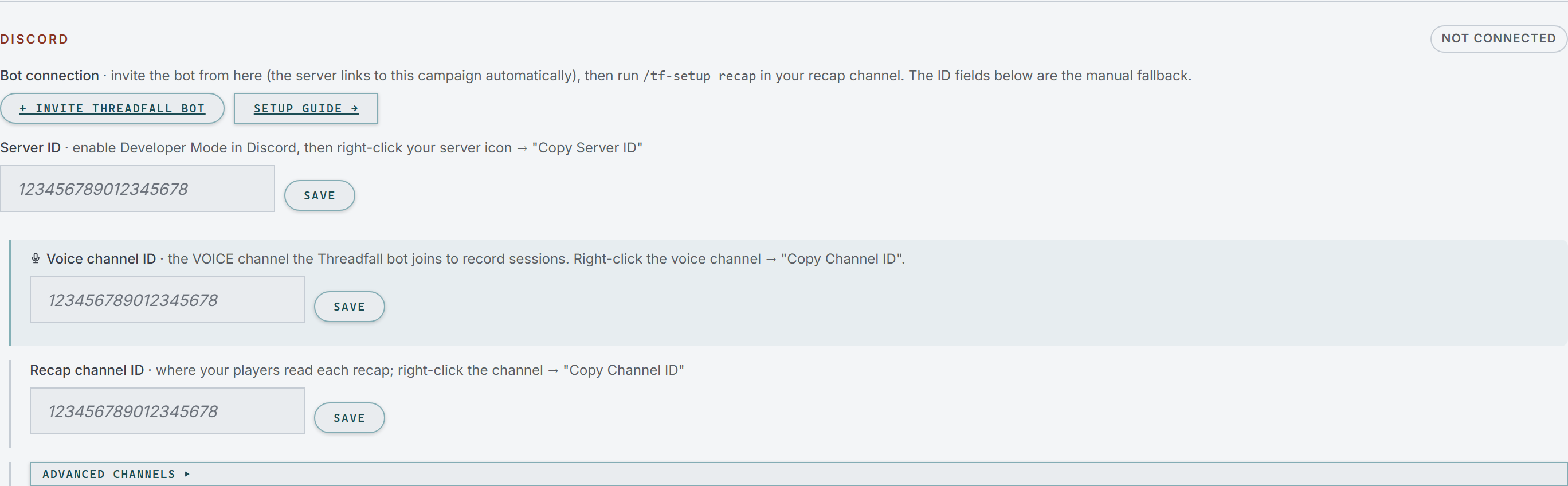
Invite the bot. In Threadfall, open your campaign's Manage tab, go to Discord, and click + Invite Threadfall bot. Pick your table's server and approve the permissions Discord shows you. The server connects to this campaign automatically.Manage, then Discord, before a bot is invited.
Link your Discord account. In Threadfall, open your Profile and click Link Discord. This is how the bot knows you are the GM. If it already says ✓ Linked as your Discord name, skip this step.
Choose where recaps post. In Discord, open the text channel your players read (for example #recaps) and send /tf-setup recap. The bot replies with a message only you can see.
Choose where the bot records. In Discord, click your table's voice channel, open its chat with the chat bubble icon, and send /tf-setup voice there.
Use it. When you play, open the Live screen, choose Discord Bot, and hit record.Discord Bot chosen on the Live screen.Once the recap is written, open the chapter in the Chronicle, open Session Tools, and click 🔗 Publish to Discord.
Recording your table
The table can see it. The bot joins your voice channel as Threadfall bot and posts a recording notice in the channel.
Each player needs their own mic. Two people on one microphone are heard as one voice. Bluetooth headphones and any browser are fine.
You can close the laptop. Recording runs on Threadfall's servers, not in your browser. Stop it from the Live screen, or kick the bot from the voice channel; either way it saves what it heard.
Character names in the transcript. Put the character's name in a server nickname, like Trav | Thalen, and those lines read as Thalen. During a recording, the Live screen's Speakers tab lets you match any voice to a character, and Threadfall keeps that for later sessions. Music bots are muted automatically, and you can mute any other source from the same tab.
Change something later
Move recaps to a different channel
Send /tf-setup recap in the new channel. Recaps already posted stay where they are.
Post live-session notices in another channel
When you start a recording with Announce on Discord ticked on the Live screen, the bot posts that the session is live. It goes to your recap channel unless you choose another: send /tf-setup announce in that channel, or add it in Manage → Discord → Advanced channels.
Give /tf-reveal posts their own channel
Codex entries you post for players with /tf-reveal go to your announce channel, or to your recap channel if you haven't set one. To give them their own channel, send /tf-setup reveal in it, or add it under Advanced channels.
Manage, then Discord, with Advanced channels open.
Have recaps post themselves
This is off until you turn it on. In Manage → Next Session, tick Auto-post finished recaps. A finished recap is scheduled instead of posting the moment it is written, and Threadfall notifies you first with Post now and Hold.
Manage, then Next Session.
Post the full recap, not only the summary
A recap posts as a short summary with a link to the full chapter. Tick Post full recap in thread in the publish dialog to add the whole recap in a thread under the post. Threadfall remembers the choice for your next recap.
Remind the table before the next game
Set the date and time in Manage → Next Session. The bot posts a “Last time on…” reminder to your recap channel 24 hours before. To post it right away instead, click Send reminder now.
Live once a server and a recap channel are set.
If you schedule games as Discord events, tick Auto-sync from Discord scheduled events and Threadfall checks your server every hour, or click Sync now →.Ticking this reads your server's next event. Sync now skips the wait. When your server has events for several games, Threadfall asks which one belongs to this campaign. Auto-sync is off while Repeat is set.
Use one server for more than one campaign
Add the campaign name to the command, for example /tf-setup recap campaign:Voidwalkers. If the name doesn't match, the bot lists your campaign names.
Move to a different server
Disconnect (below), invite the bot to the new server from Manage → Discord, then send /tf-setup recap and /tf-setup voice there.
Disconnect Discord
In Manage → Discord, click Set up by hand if the ID fields are hidden, empty the Server ID field, click Save, and confirm Disconnect. Nothing already posted in Discord is removed. To take the bot out of your server as well, remove it in Discord.
Commands your table can use
Anyone using these needs their Discord linked to Threadfall (Profile → Link Discord).
/tf-bard: a player asks what the party knows, and the bard answers in the channel from your recaps, revealed Codex entries and quests. It only uses what players are allowed to see, and each person gets a few questions an hour.
/tf-codex: looks up a Codex entry by name and posts it to the channel. To check a name that came up in chat, right-click the message and choose Apps → Codex Lookup. Only revealed entries show up.
/tf-reveal: GM or co-GM, in a connected channel. Files an NPC, location, item or faction into the Codex with an image up to 10 MB, hidden from players until you click Post for players →.
/tf-setup: GM or co-GM. Connects the channel you send it in as recap, voice, announce or reveal.
If something isn't working
The bot says it doesn't recognise your Discord account
Link it in Profile → Link Discord, then send the command again.
The bot asks which campaign you mean
Your server hosts more than one of your campaigns, or you run several and this server isn't connected yet. Add campaign: with one of the names it lists.
/tf-setup voice tells you to use the voice channel's chat
Click the voice channel, open its chat with the chat bubble icon, and send the command there.
Recording won't start: “Set your Discord server and voice channel”
The voice channel isn't connected yet. Send /tf-setup voice in the voice channel's chat.
Manage says “Bot can't see this server” or “Bot can't see this channel”
For the server, invite the bot again from Manage → Discord. For a channel, give the Threadfall role View Channel and Send Messages in that channel's permissions in Discord.
You published a recap and nothing appeared
Read the message at the top of the screen; it shows the error Discord sent back. The usual cause is a missing permission in that channel: Send Messages, or Create Public Threads when you post the full recap in a thread.
The transcript shows Discord names instead of characters
During a recording, match each voice to a character in the Live screen's Speakers tab. Threadfall keeps it for later sessions.
A command is missing in Discord
Discord keeps an old list of commands. Press Ctrl+R (Cmd+R on a Mac) in Discord, or restart the app.
The bot was added before July 2026 and won't record
Older installs don't have the voice permissions. Open the invite link again for the same server; Discord adds the missing permissions and nothing else changes.
Set it up by hand
If you'd rather paste IDs than use /tf-setup, the same settings are in Manage → Discord (click Set up by hand if the fields are hidden). In Discord, turn on Developer Mode under User Settings → Advanced. Right-click your server icon and choose Copy Server ID, or right-click a channel and choose Copy Channel ID, then paste it in and click Save. The channel's name appears beside the field when the bot can see it.
If you invited the bot some other way, the first /tf-setup you send connects the server. Plain invite link
What the bot can do in your server
No admin rights and no server management. The bot asks for:
View Channel and Send Messages, to post recaps and reminders
Embed Links, for the link to the full recap
Create Public Threads and Send Messages in Threads, for full recaps in a thread
Mention Everyone, for the optional @here ping, which you choose each time you publish
Connect and Speak, to join your voice channel and record
Change Nickname, to name itself Threadfall bot in your server
To keep the bot out of a channel, change that channel's permissions in Discord after you invite it. The bot only posts in the channels you connect.